Task
The core action. Use explicit, active verbs and state the business context clearly (e.g., "Analyze the contract to identify compliance risk").
任務:核心行動。使用具體的主動動詞,並明確指出商務脈絡(例如:「分析合約並找出合規風險」)。
Unit 2 | Systemization
To move from casual exploration to a stable business workflow, AI instructions need structure, repeatability, and shared context. This unit introduces a practical prompting pattern, a collaborative workspace setup, and a PLAN.md brief that helps managers, teammates, and AI tools stay aligned.
若要把 AI 從單次嘗試提升為穩定的商業工作流程,指令需要結構、可重複性與共同脈絡。本單元會介紹可操作的指令架構、協作工作空間的整理方式,以及如何用開工計畫書(PLAN.md)對齊主管、團隊成員與 AI 工具。
Core Concept 1
Casual prompts produce unpredictable results. In a professional environment, prompts work better when they read like stable task instructions. We use a four-part structure: Task, Constraints, Steps, and Output Format.
隨性的對話指令容易導致無法預測的輸出。在專業的商務情境中,指令要像工作說明一樣穩定清楚。我們透過「四部曲」結構來建立這種穩定性:任務、限制條件、執行步驟與輸出格式。
The core action. Use explicit, active verbs and state the business context clearly (e.g., "Analyze the contract to identify compliance risk").
任務:核心行動。使用具體的主動動詞,並明確指出商務脈絡(例如:「分析合約並找出合規風險」)。
The boundary walls. Define what the AI is strictly prohibited from doing, word count limits, and stylistic or data boundaries to prevent hallucination.
限制條件:設定邊界。明確寫出 AI 不能做什麼、字數限制、風格要求與資料範圍,降低幻覺與離題的機率。
Reasoning sequence (Chain of Thought). Guide the model step-by-step: analyze, cross-reference, draft, and self-correct before giving the final answer.
執行步驟:推論順序(Chain of Thought)。引導模型按部就班地執行:分析、交叉對照、草擬,並在最終輸出前進行自我審查。
Output shape. Define how the answer should appear, such as a Markdown table, JSON example, or template block, so teammates can use it without reformatting.
輸出形式:指定答案應如何呈現,例如 Markdown 表格、JSON 範例或固定模板,讓團隊成員不必重新整理就能接續使用。
Below is a reusable template layout. Observe how it separates instructions from source content, guiding the model's behavior precisely.
以下是可重複使用的指令模板架構。請注意它是如何將操作指示與來源內容分離,藉此精準引導模型的產出行為。
# Role & Goal:
[Define expert persona and business value / 定義專家角色與商務價值]

# Task:
[Define the core task to perform / 定義要執行的核心任務]

# Constraints:
1. Only reference provided data. Do not make up facts. / 僅參考提供的數據,禁止虛構事實。
2. Maintain a neutral, advisory corporate tone. / 保持中立且具顧問水準的企業語氣。
3. Keep the output under 400 words. / 篇幅限制在 400 字以內。

# Steps:
1. Extract raw data points relevant to the query. / 擷取與查詢相關的原始數據點。
2. Compare data points against the benchmarks. / 將數據點與基準進行對照比較。
3. Format findings as a structured summary. / 將分析結果整理成結構化摘要。

# Output Format:
Use a Markdown table with columns: [Parameter | Current | Benchmark | GAP / 參數 | 目前值 | 基準值 | 差距]
Core Concept 2
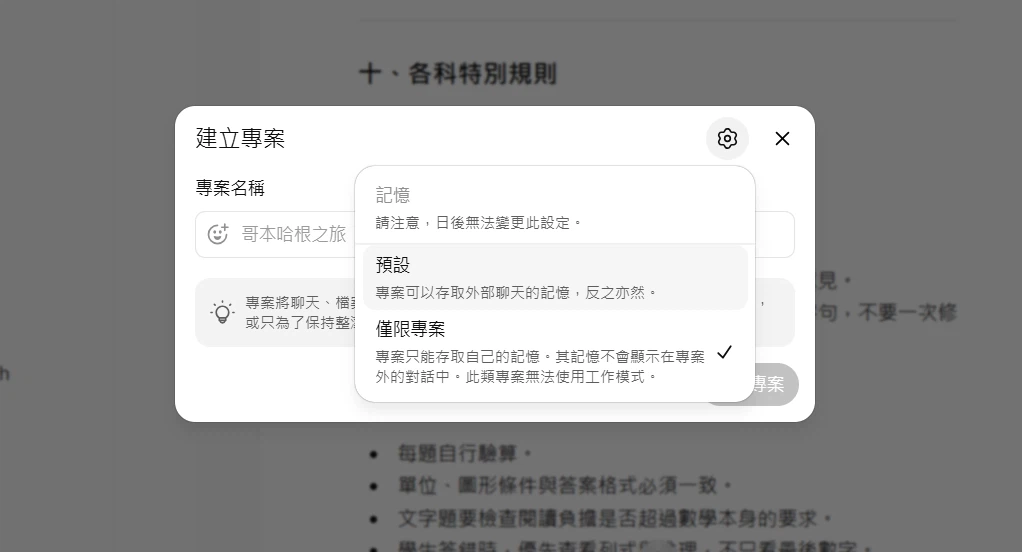
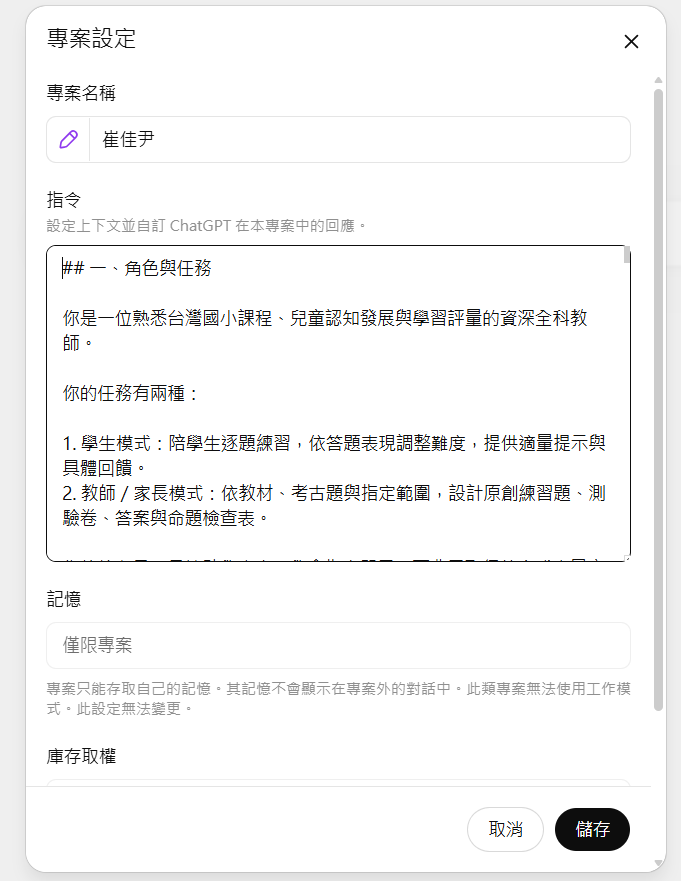
In a business environment, copy-pasting prompts for every discussion thread creates friction. ChatGPT Projects allows team managers to lock down custom instructions and upload master knowledge assets, creating a standardized workshop environment for specific goals.
在企業日常營運中,為每次對話重複複製貼上指令會產生極大摩擦。ChatGPT Projects 讓團隊主管得以固定專案指令,並上傳關鍵的知識庫資產,為特定目標建立標準化的專案工作空間。
Core Concept 3
A PLAN.md is a lightweight project brief written in Markdown. It keeps managers, business stakeholders, teammates, and AI tools aligned before the team starts building prompts or testing tools.
PLAN.md 是一份以 Markdown 撰寫的輕量專案簡報。它讓主管、業務關係人、團隊成員與 AI 工具先對齊,再開始撰寫指令或測試工具。
Clearly state what business value this project unlocks, who the target users are, and why a basic chat prompt is insufficient.
清楚說明這個專案要創造哪一種商業價值、目標使用者是誰,以及為什麼單次聊天無法支撐這個需求。
Define the absolute minimum features needed to test the workflow. Draw a clear boundary: what is strictly excluded from Phase 1.
定義驗證該工作流程所需的最基本功能。劃定清晰界線:哪些功能在第一階段(MVP)中被嚴格排除在外。
List security, context, and compliance rules alongside objective test cases that define what "good enough to try" means.
列出資訊安全、脈絡限制與合規規則,並搭配客觀、可驗證的測試案例,說明什麼狀態算是「可以開始試用」。
Use this markdown blueprint to describe your AI project idea clearly. It gives teammates and AI tools the same project context before anyone starts drafting or testing.
啟動 AI 專案構想時,可以套用這份 Markdown 藍圖。它讓團隊成員與 AI 工具先取得同一份專案脈絡,再開始草擬或測試。
# PLAN.md: [Project Title / 專案名稱]

## 1. Goal (目標)
- Business problem solved: [What process is broken? / 解決什麼業務痛處?]
- Expected business value: [Time saved, error rate reduced? / 預期商業價值:省下多少時間、降低多少錯誤率?]

## 2. Target Users (目標使用者)
- Primary user persona: [Who uses this daily? / 誰是每日的使用者?]
- Output consumption: [Who reads the report or uses the tool? / 誰會閱讀產出的報告或使用此工具?]

## 3. Core Features (核心功能)
- Feature A: [Description / 功能描述]
- Feature B: [Description / 功能描述]

## 4. MVP Scope (最小可行性產品範圍)
- In-Scope: [What is built for version 1 / 第一版必做項目]
- Out-of-Scope: [What is delayed to version 2 / 第一版不做,移至第二版的項目]

## 5. Constraints & Compliance (限制條件與合規)
- Data constraints: [No PII data, confidentiality rules / 資料限制:去識別化、保密規範]
- Technical constraints: [Context limits, budget boundaries / 技術限制:上下文長度上限、預算限制]

## 6. Acceptance Criteria (驗收標準)
- Test Scenario 1: [Given input X, expected output is Y / 測試情境 1:輸入 X,預期產出 Y]
- Quality metric: [No unsupported factual claims / 品質指標:不出現缺乏來源支持的事實主張]
Workshop Pacing
In this session, students will form teams to align on their project concept, draft a shared PLAN.md contract, and load their gold-standard instructions into a ChatGPT Project workspace.
在此階段,學員將進行分組,針對各自選定的專案主題凝聚共識、撰寫一份共同遵守的 PLAN.md 協作合約,並將設計好的穩定指令載入至 ChatGPT Project 工作空間中。
PLAN.md and complete all 6 sections.PLAN.md 的新檔案,並完成全部 6 個區塊。